Projects
A selection of my recent work and projects.
Overview:
Finance Tracker
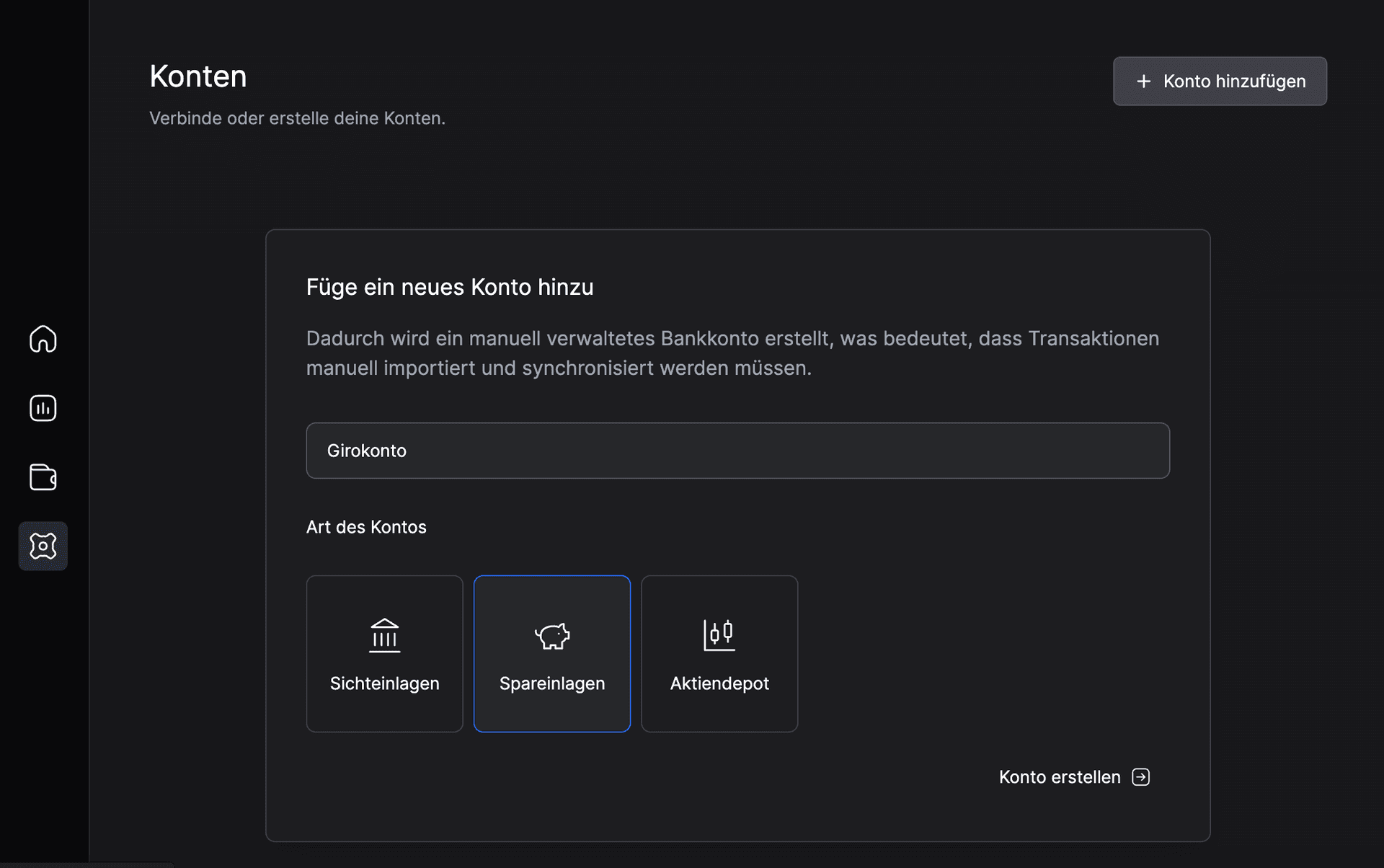
A personal finance tracking application built with React and TypeScript. I am a big fan of Linear's architecture and design principles, so I aimed to create a similar experience for managing personal finances. The app features intuitive transaction logging, budget tracking, and insightful analytics to help users stay on top of their financial health. It is designed to work offline and syncs data when back online, ensuring seamless usability. (Local first paradigm inspired as discussed in Local-first software: You own your data, in spite of the cloud.)
Architecture
The application is structured into modular components, each responsible for specific functionalities such as transaction management, budget tracking, and reporting. State management is handled using mobx-state-tree, which provides a good structure and the opportunity to abstract persistence in lower layers, without putting the burden on the UI. The UI is designed with the headless components provided by Radix UI through shadcn/ui, ensuring accessibility for a keyboard-focused workflow and a consistent look and feel across the application.
Below is a high-level architecture diagram of the Finance Tracker application:
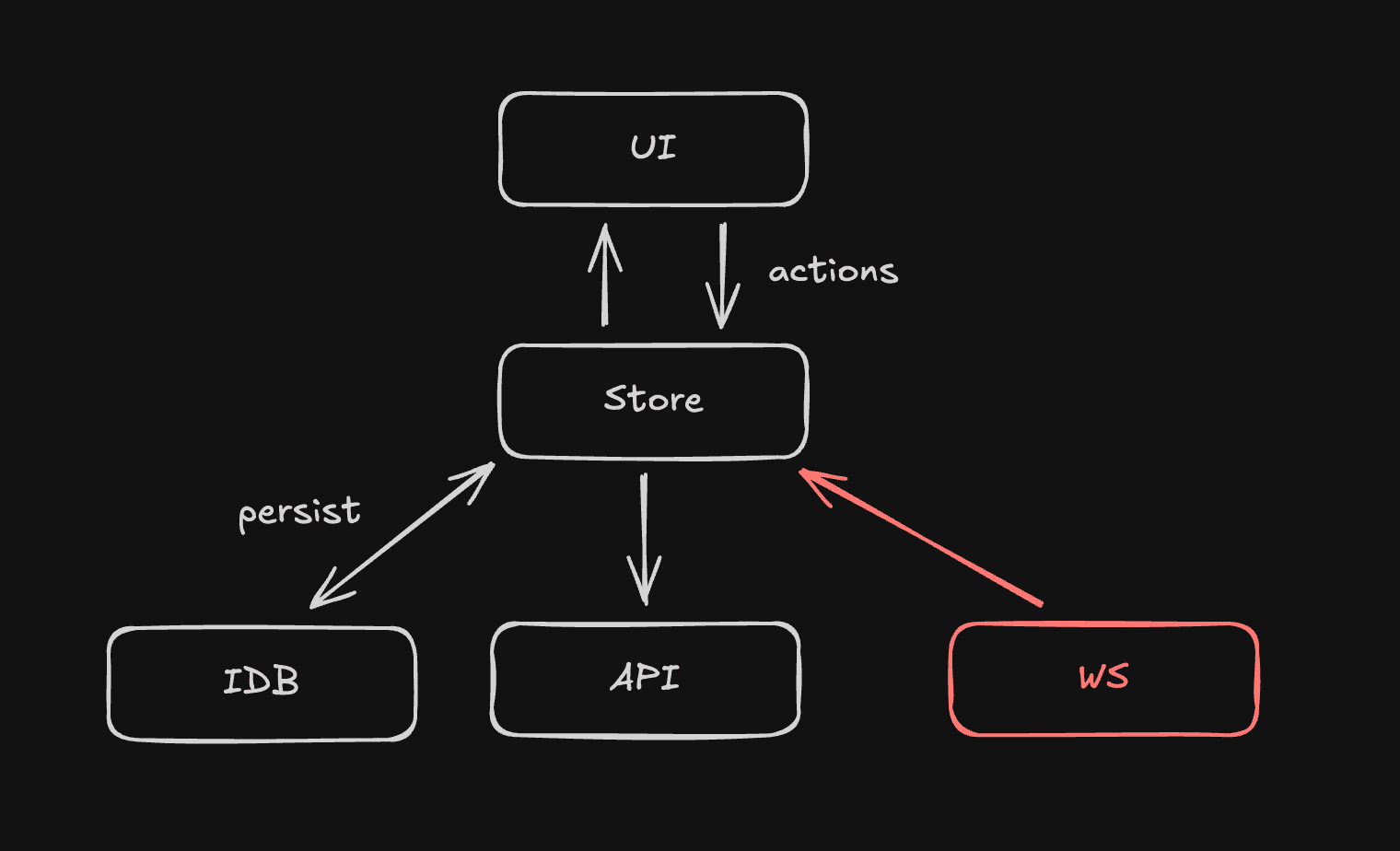
- UI: Built with React and Radix UI components for accessibility and consistency.
- State Management: Utilizes
mobx-state-treefor predictable state management and abstraction of persistence state persistence. - Data Persistence: Abstracted layer to handle data storage, allowing for easy integration with different storage solutions. For offline availability, it uses IndexedDB to persist objects locally in the browser, while syncing with a backend server when online.
- Backend API: A GraphQL API built with Nest.js to handle data synchronization, user authentication, and other server-side logic.
Not implemented yet, but the plan is to add a Websocket server as a real-time communication layer for live updates and synchronization.
Syncing
The goal is to have a seamless developer experience when handling Models. Ultimately, a developer should be able to define a Model once and have it work both locally and remotely without extra effort.
A model is defined with a mobx-state-tree schema:
const ManualBankAccount = types
  .model("ManualBankAccount", {
    id: types.identifier,
    name: types.string,
    currency_code: types.enumeration(Object.values(CurrencyCode)),
    created_at: types.Date,
    updated_at: types.Date,
    account_type: types.enumeration(Object.values(BankAccountType)),
  })
Inserting a model is as easy:
ManualBankAccount.create({
  id: self.crypto.randomUUID(),
  name,
  currency_code: CurrencyCode.EUR,
  created_at: new Date(),
  updated_at: new Date(),
  account_type: type,
});
Together with MST, I created an abstraction layer that handles syncing transparently. While creating the RootStore, the onPatch method can be defined:
export const createRootStore = (db: IDBPDatabase, initialState: any) => {
  const store = RootModel.create(initialState, {
    db,
  });

  onPatch(store, async (patch, reversePatch) => {
    await persistPatchToIDB(db, patch); <-- persist locally
    await syncToRemote(patch); <-- sync to remote server
  });

  return store;
};
The persistPatchToIDB function (optimistically) persists the patch to IndexedDB for offline availability. It's optimistic because the patch is applied before synchroinizing to our API server and thus could be rejected. This is a trade-off to ensure a snappy user experience but can lead to "weird UI" because updates could be rolled back.
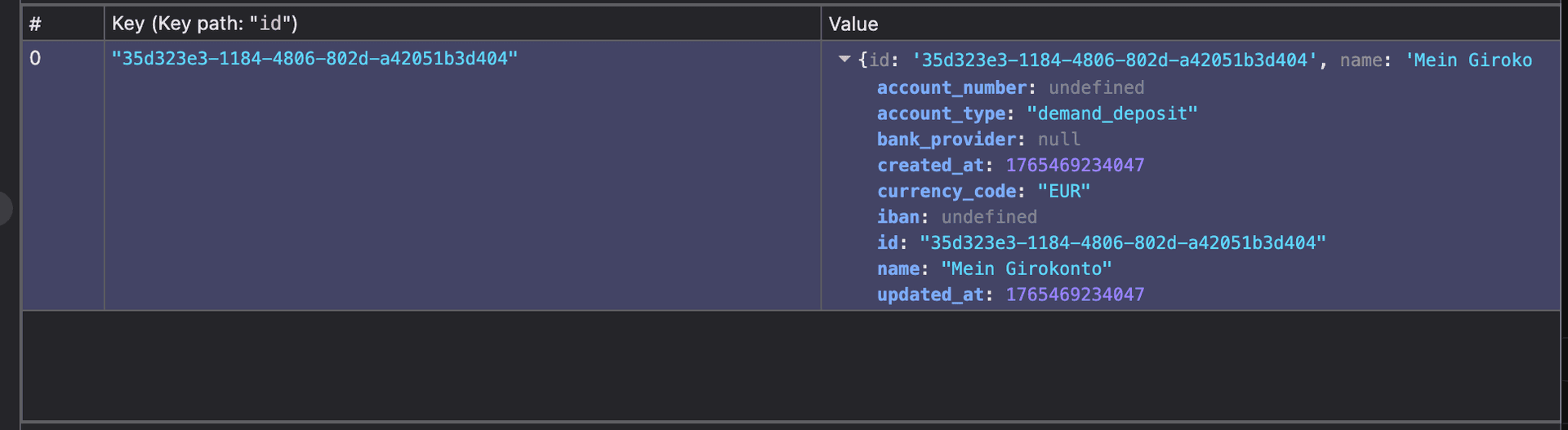
export const persistPatchToIDB = async (db: IDBPDatabase, patch: IJsonPatch) => {
  const objectStoreName = patch.path.split('/')[1];

  switch (patch.op) {
    case 'add':
      await db.put(objectStoreName, patch.value);
      break;
    case 'remove':
      // ...
    case 'replace':
      // ... handle update
  }
};
The syncToRemote function sends the patch to the remote server for synchronization.
Another TODO here is to implement conflict resolution strategies when syncing data between local and remote sources, including last-write-wins and merging changes locally. Also, an undo mechanism can be implemented using the reversePatch provided by MST.
Also note that the code above is simplified for clarity. In a production application, additional considerations such as error handling, batching of patches, etc. would be necessary. Overall I was very satisfied with how this architecture turned out and it made handling offline-first data syncing a breeze with mobx-state-tree.
Directory Structure (Monorepo)
Below is a simplified directory structure of the Finance Tracker application:
I went with the monorepo approach using pnpm. and Turbopack. This allows for better code sharing between different parts of the application, such as shared components and utilities. It also simplifies dependency management and versioning across the entire project.
A direct benefit for example was that I could define interfaces for my Models in the shared core package and reuse them both in the web and api packages. My goal was there to introduce a code-level synchronization mechanism, so whenever I update a Model interface, both the frontend and backend are immediately aware of the changes. And the cool thing is there is nothing special about the models interface, it's just a normal TypeScript interface!
A problem I haven't solved yet is making the mobx-state-tree models adhere to the interface provided, basically making the code not compile unless the interface is satisfied. This would ensure full type safety across the entire stack when models are updated.
SendEink
SendEink was born out of my personal need to send documents to my e-ink reader easily. Initially, I built a simple script to automate the process, but I soon realized that others might find it useful too. Thus, SendEink was created as a SaaS platform to streamline document sending to e-ink devices.

The landing page of SendEink, built with TailwindCSS, showcases the key features and benefits of the service, enticing users to sign up and showing parts of the in-app dashboard to attract potential customers. It's kept intentially simple to focus on the core value proposition of SendEink.
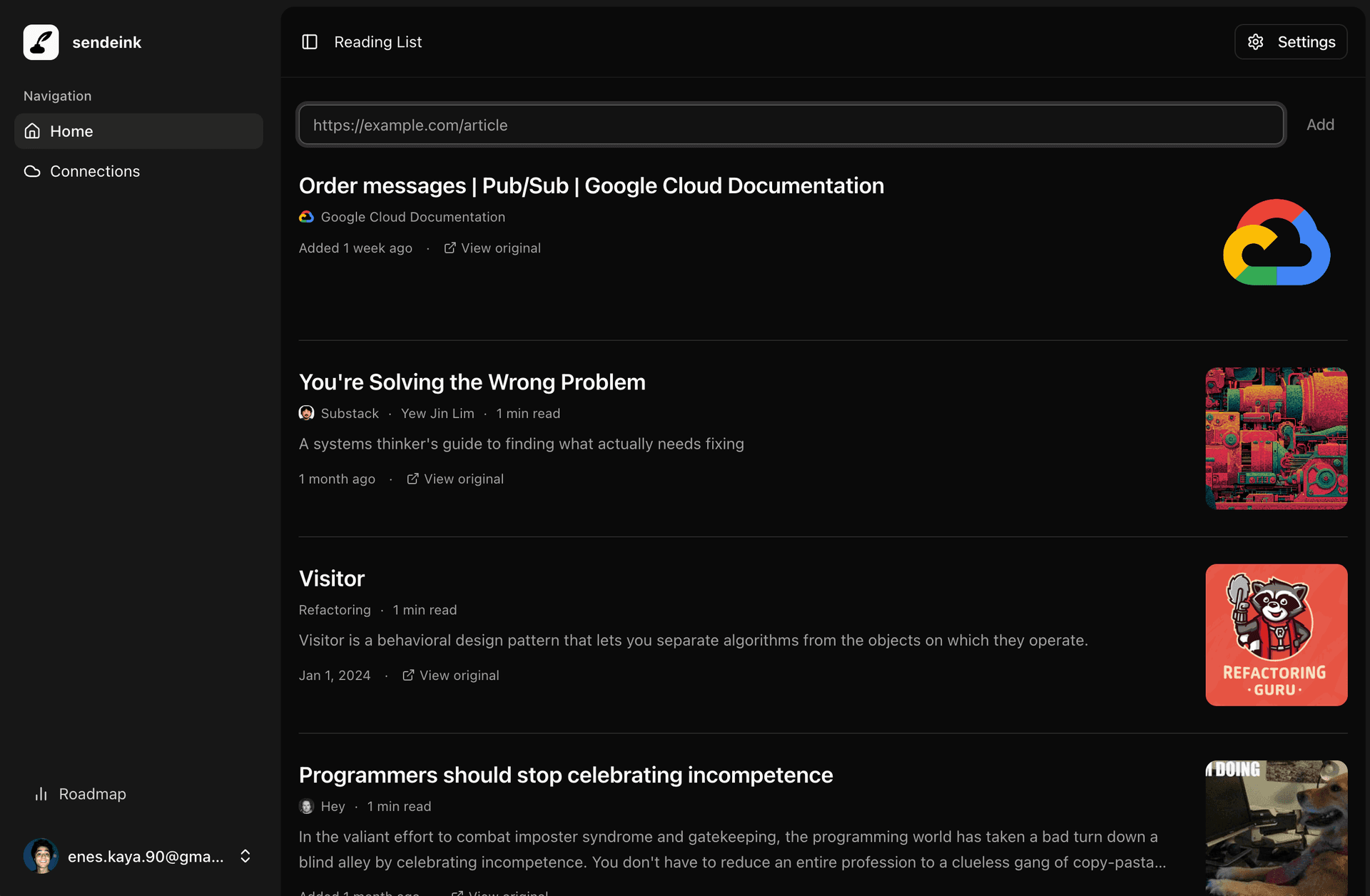
How it works: After signing up, users can connect their cloud storage (currently only Google Drive) accounts to SendEink. They can then add documents by providing URLs to online articles. SendEink fetches the content, converts it to a PDF optimized for e-ink displays (using readability.php - a PHP port of Mozilla's Readability.js), and uploads it to the user's connected cloud storage. The user can then access the document from their e-ink device.
Here's a small demo (though with an older version of the UI):
SendEink is built with Laravel and React with TypeScript, using Inertia for server-side rendering and routing. This (IMO) brings the best of both worlds - Laravel because it provides a robust backend framework with built-in features like authentication, database management, and routing, allowing me to focus on building the core functionality of SendEink without reinventing the wheel. It's also possible to leverage the built-in task scheduling (Queues, Jobs) capabilities of Laravel to handle background jobs like when adding a URL to fetch the document and send it to the e-ink device.
After Signup and email verification, users can access the dashboard where they can manage their Cloud connections for PDF upload, add documents via URL, and monitor the status of sent documents.
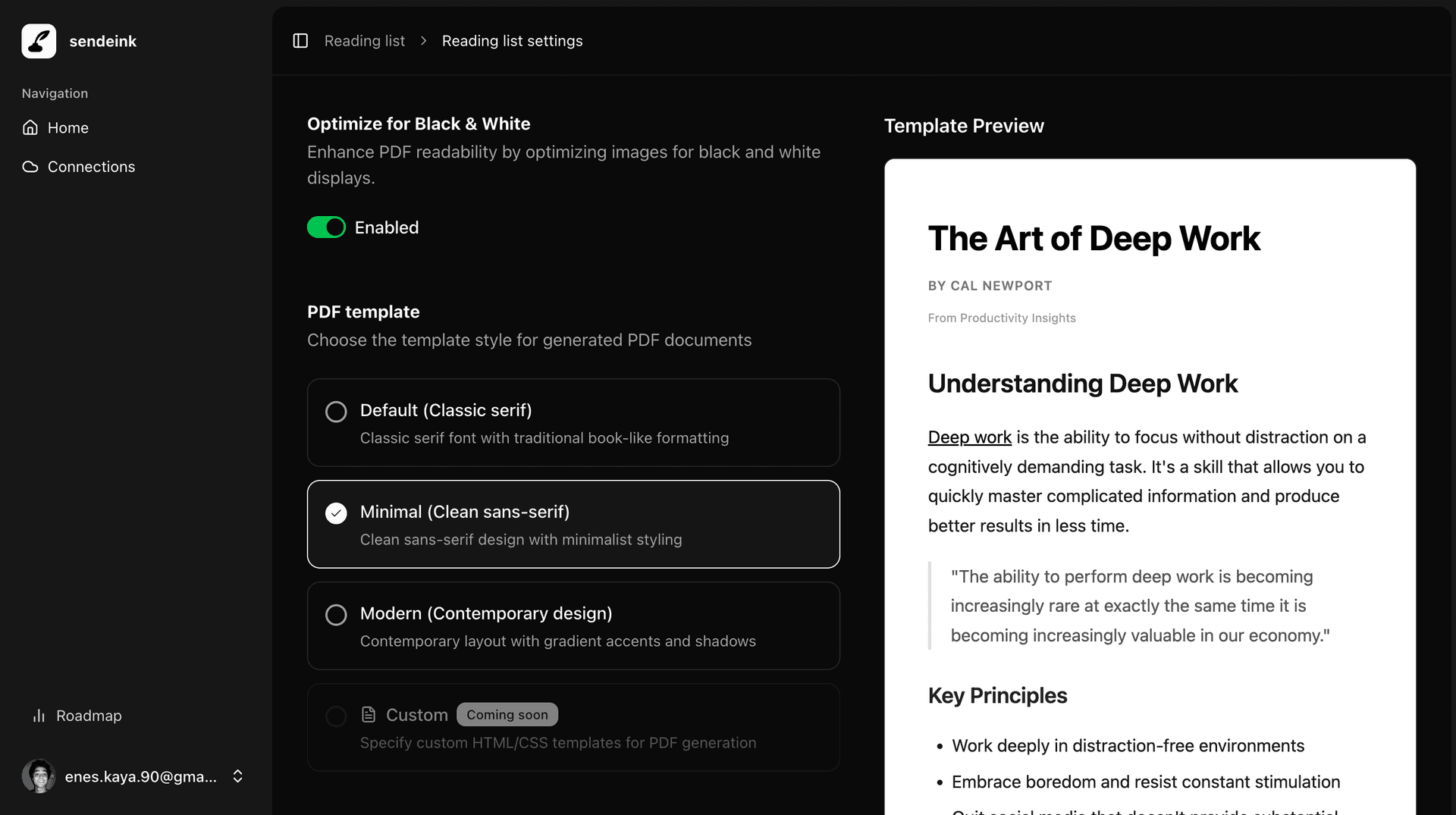
On the reading list page, users can also enter the settings page to select from pre-made themes to customize the appearance of the PDFs sent to their e-ink devices. In the future I plan to allow users to create custom themes as well.